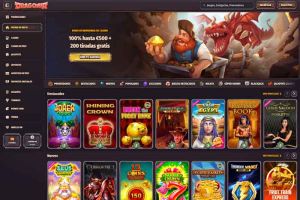
Online casino homepages can place games, promotions, sport, account tools and support in one crowded space. For New Zealand adults comparing legal online casinos, the practical challenge is often not finding a title but understanding where each function sits and which information applies to the account. Dragonia presents a broad platform covering casino games, live tables, jackpots, sportsbook features and account services. The surf1020.com/ homepage can therefore be approached as a navigation task: identify the right area, confirm the relevant conditions and avoid treating promotional labels as a substitute for the detailed terms.
Begin with the page structure, not the most prominent offer
A useful first visit starts by identifying the main routes rather than selecting the brightest banner. The casino area leads towards video slots, instant games, table games, live casino, jackpots and game shows. A separate sportsbook section covers pre-match and live betting across major sports. Account options generally sit around registration, login, profile details, bonuses, verification and financial activity.
This separation matters because different sections can carry different conditions. A casino promotion may have its own qualifying deposit, expiry period, contribution rules and maximum bet, while a sports offer may use entirely different requirements. Treating every banner as a general site benefit can make it difficult to understand what has actually been activated. Read the short description, then open the relevant offer details before committing funds or placing a qualifying bet.
It is also sensible to distinguish information pages from action controls. A game lobby helps with discovery; a profile area manages account-related choices; a help centre explains procedures; and customer support is the appropriate route when a rule is unclear. This simple mental map reduces unnecessary searching and helps prevent decisions being made from a homepage headline alone. If a feature is not clearly displayed, check the applicable terms or ask support rather than assuming it is available.
Use filters to reduce a crowded game lobby
Large lobbies are easier to use when approached with a specific question. Instead of scrolling through every title, decide whether you want to compare a provider, a game type or a curated collection. Available filters include provider selections and groupings such as new, popular, exclusive and feature-based games. Separate collections cover jackpots, live dealer titles and game-show formats.
Filtering by type can also clarify the style of play you are considering. Slots and instant games are generally found apart from roulette, blackjack, baccarat, poker, dice and live tables. Jackpot groupings may be useful for discovery, but their presence does not explain the odds, contribution rules or eligibility conditions for a particular title. Open the individual game information where available and avoid assuming that two games in the same collection operate in the same way.
Country and provider restrictions can affect what appears in the lobby. A listed studio or visible title is not a guarantee that every account can access it, and game counts may change. Some selected titles offer demo play, which can help with learning the interface, paylines or basic controls. It cannot establish likely results or prove that a game is suitable for real-money play. A short demonstration is a navigation aid, not evidence of profitability, return or volatility.
Check account tools before relying on a promotion
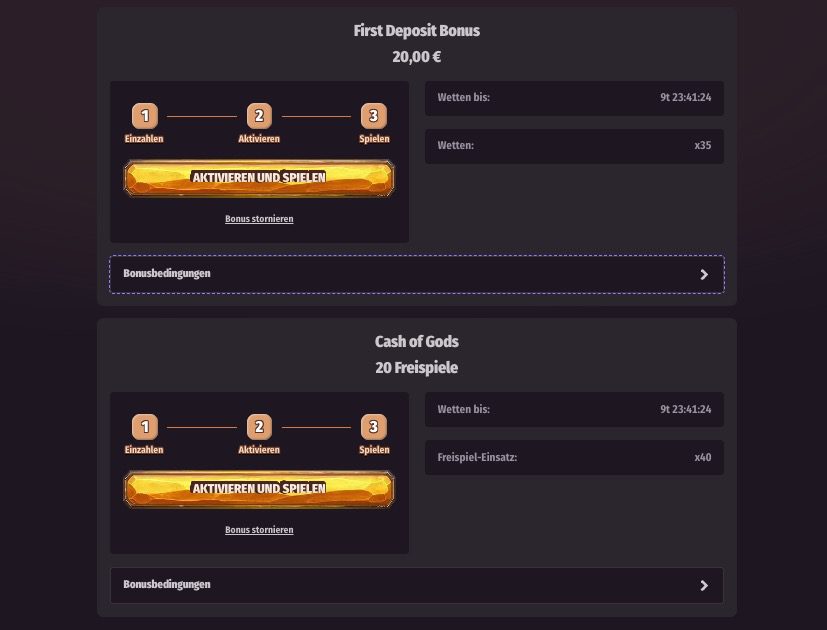
The profile area is important because promotional activity is not always automatic. The reviewed welcome offer is activated through the Profile/My Bonus area, and the terms state that it must be claimed before bets are placed with the qualifying deposit. That makes the order of actions significant: read the offer, check eligibility, confirm the activation route and only then decide whether the conditions suit you.
Promotions can also introduce several separate tasks. The reviewed offer describes a deposit match, bonus spins released in daily batches and a separate pick connected with another deposit threshold. It also states wagering requirements, a ten-day completion period, a maximum permitted bet while active and exclusions for certain deposit methods. These details are more useful than the headline amount when deciding whether an offer is manageable.
Look for the balance distinction between cash and bonus funds, the progress indicator and any cancellation control. Cancelling an active bonus may remove the remaining bonus balance and affect associated winnings. A withdrawal made at the wrong point may also affect eligibility under the stated terms. For general guidance about gambling regulation and consumer information in New Zealand, consult the Department of Internal Affairs gambling information. It does not confirm the conditions of any particular operator, so the operator’s own current terms remain essential.
Make verification and payments easy to track
Navigation is most useful when it shows what must happen before money can move. The account and verification areas may request proof of identity, age, address, payment ownership, transactions or source of funds. Phone or face checks may also be requested. Documents are stated to be due within 30 days, while the help information gives a typical review period after complete documents are received; further checks can take longer.
The cashier is the practical place to confirm which payment methods, currencies, limits and fees apply to a particular account. General payment lists are not proof that every method is available in New Zealand or that a method supports withdrawals. Before depositing, check the live cashier rather than relying on a general payments page. Also note whether a withdrawal must return to the original method and whether verification must be completed first.
Withdrawal conditions deserve their own review because they may sit outside the promotional page. The stated terms refer to processing periods, account-level limits, pending withdrawal restrictions and turnover requirements, with further checks potentially causing delays. These are not details to discover only after requesting funds. Save or record the applicable conditions, keep personal information current and contact support if the displayed account information conflicts with the general terms.
Use mobile navigation without mistaking convenience for an app
The responsive website is designed for mobile-browser use, allowing casino and account functions to be accessed without a separate download. A smaller screen makes the site more dependent on clear menus, readable account labels and careful scrolling. Rotate the device if a game interface is cramped, close unused tabs and use the latest supported browser version where possible.
The Create Shortcut option should be understood accurately. It creates a browser shortcut on the device; it is not confirmation of a dedicated native Android or iOS application. That distinction matters for installation expectations, permissions and troubleshooting. If a shortcut stops working, open the website directly through the browser before assuming that the account or service is unavailable.
Mobile access also makes account security part of navigation. Use a private device where practical, protect the registered credentials and avoid saving passwords on shared hardware. If login fails, check the entered details, try the password-reset route and clear browser cache or cookies when appropriate. Game, payment and account availability may depend on the device, browser and location, so a desktop result should not automatically be treated as proof of identical mobile access.
Which menu should I use first?
Where can I compare games without searching randomly?
Open the casino lobby and use filters for game type, provider or curated collection. Start with one category, then inspect individual game information. Remember that titles shown in a lobby may still be subject to country or provider restrictions, so visibility alone does not guarantee access from every account.
Where are promotional conditions usually managed?
Promotional activation and progress are described as being managed in the Profile/My Bonus area. Read the relevant offer before activating it, including qualifying deposits, expiry periods, wagering rules, bet limits and exclusions. If the expected control is missing, contact support rather than activating a different promotion by mistake.
What should I check when a mobile page is not working?
Confirm that the browser is up to date, recheck your login details and clear cache or cookies if necessary. You can try opening the site directly instead of using a device shortcut. If the issue continues, contact support and explain the device, browser and page where the problem occurred.